The best bird identification app for most people is Merlin Bird ID from the Cornell Lab of Ornithology. It’s free, it works on iPhone and Android, and it can name a bird from a photo, from a recording of its song, or from a few questions about what you saw. If you want to keep a record of your sightings that scientists can use, add eBird. If you want a full field guide on your phone, the free Audubon Bird Guide and the paid Sibley Birds app are the two to look at. Below is our chart of what each of seven popular apps does, then a short take on each one.
Chart: which bird app does what?
We built this chart from each app’s U.S. App Store listing and, for Merlin, the Cornell Lab’s own guide to the app. A check means the maker says the app does that job. A dash means the maker doesn’t say so in those pages, not that the feature is missing for certain. Tap or click the chart to open the full-size version.
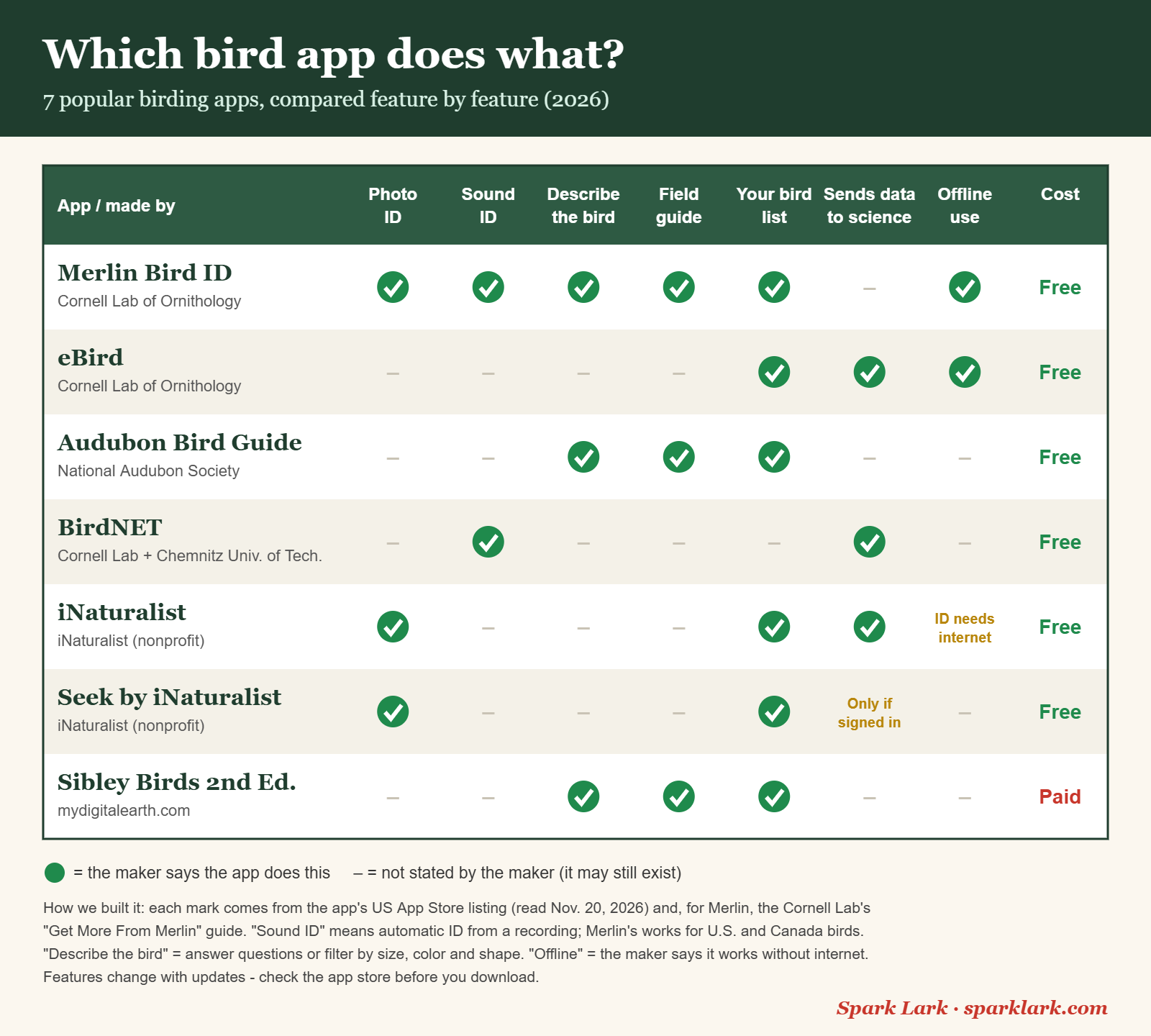
Two notes on reading it. “Sound ID” means the app listens to a recording and suggests the species automatically; apps that only play reference songs don’t count. “Describe the bird” means you answer questions or filter by size, color and shape to narrow the list.
The short version
- Just want to know what that bird is? Merlin Bird ID (free).
- Want to name birds by their songs? Merlin first; BirdNET as a second opinion (both free).
- Want to log what you see and help science? eBird (free).
- Want a full field guide? Audubon Bird Guide (free) or Sibley Birds 2nd Edition (paid).
- Birding with young kids, or curious about plants and bugs too? Seek by iNaturalist (free, no account needed).
1. Merlin Bird ID: the one to download first
Made by: Cornell Lab of Ornithology · Cost: free · Phones: iPhone and Android
Merlin gives you several ways in. Answer a few questions about the bird, upload a photo, record a singing bird, or browse the birds of a region. The Cornell Lab says the app now covers more than 10,000 species worldwide and has passed 10 million downloads. Its Photo ID and Sound ID learn from photos and recordings that birders share with eBird and the Cornell Lab’s Macaulay Library.
A few features people miss, all described in Cornell’s guide to the app: set your location ahead of time and Merlin will work with no signal; download Bird Packs for places you’re traveling; filter Explore Birds to “Likely Birds” and sort by “Most Likely” to get a study list for your area and date; and link your eBird life list so Merlin can show the species you haven’t seen yet.
Keep in mind: Cornell’s guide says Sound ID covers birds of the U.S. and Canada, with more regions being added. Any automatic ID is a suggestion. Check that the bird fits your area and season, then look or listen for it yourself.
2. eBird: for keeping lists that count
Made by: Cornell Lab of Ornithology · Cost: free · Phones: iPhone and Android
eBird doesn’t identify birds for you. It’s where you record what you saw. The app sends each checklist to your eBird account, and the Cornell Lab says it makes that data openly available for research, education and conservation. Checklists are tailored to your location and time of year, rare species get flagged as you enter them, and you can pick from mapped birding “hotspots.”
The listing says the app has “full offline functionality,” so you can count birds where there’s no signal and submit later. Pair it with Merlin: Merlin helps you name the bird, eBird keeps the record.
3. Audubon Bird Guide: a free field guide
Made by: National Audubon Society · Cost: free · Phones: iPhone and Android
Audubon’s app is a complete guide to more than 800 North American species, with over 3,000 photos, more than eight hours of songs and calls, range maps for each season, and species text by Kenn Kaufman. Its Bird ID feature asks what you saw (color, size, tail shape) and narrows the matches for your location and date. A Sightings feature keeps your life list, and the app shows nearby hotspots and recent eBird sightings.
Keep in mind: the App Store listing doesn’t mention identifying birds from photos or recordings. Use it to learn about a bird, not to have the phone name it for you.
4. BirdNET: a second opinion on bird songs
Made by: the K. Lisa Yang Center for Conservation Bioacoustics at the Cornell Lab of Ornithology and Chemnitz University of Technology · Cost: free · Phones: iPhone and Android
BirdNET is a research project. You record a sound with your phone’s microphone and the app suggests the species, drawing on a model trained to recognize nearly 3,000 of the most common species of North America and Europe. You can submit your recordings to help the project.
Keep in mind: BirdNET is only a sound tool. Its listing doesn’t mention field guide pages or photo ID. It’s most useful when Merlin gives you an answer you aren’t sure about.
5. iNaturalist: birds plus everything else
Made by: iNaturalist, a nonprofit · Cost: free · Phones: iPhone and Android
iNaturalist covers all living things, not just birds. You record what you find, the app helps identify it, and you can connect with and learn from other nature fans. Your observations become a personal record and are shared for science and conservation.
Keep in mind: the listing for iNaturalist Classic says identification works “while online,” and iNaturalist now recommends its newer, redesigned app over the Classic version. For birds alone, Merlin is the simpler tool.
6. Seek by iNaturalist: the pick for families
Made by: iNaturalist · Cost: free · Phones: iPhone and Android
Seek is iNaturalist’s camera app. Point it at a bird, plant or mushroom and it tries to name it, and you earn badges for finding different kinds of life. The listing says Seek doesn’t require registration and doesn’t collect user data by default; your location is obscured, and your precise location isn’t sent to iNaturalist unless you sign in and submit. That makes it a good fit for kids. If you’re getting children started, see our tips on getting kids interested in birdwatching and our free backyard bird bingo cards.
7. Sibley Birds 2nd Edition: the paid guide
Made by: mydigitalearth.com, with David Sibley’s artwork · Cost: paid · Phones: iPhone and Android
This app puts the Sibley guide on your phone: more than 930 North American species, the artwork from David Sibley’s Guide to Birds, Second Edition, and over 2,700 calls and songs. You can compare two species side by side, pick a state or province to see whether each bird is common, uncommon, scarce, rare or a vagrant there, and use Smart Search to filter by size, body shape, color and pattern. A personal list tracks what you’ve seen.
Keep in mind: it’s the only app in our chart that costs money, and its listing doesn’t mention photo or sound ID. It’s for people who want to study field marks, not have the phone do the identifying.
Quick comparison
| App | Best for | How it identifies | Cost |
|---|---|---|---|
| Merlin Bird ID | Most people; first app to get | Photo, sound, questions | Free |
| eBird | Logging sightings for science | Doesn’t identify; records lists | Free |
| Audubon Bird Guide | Free full field guide | Questions (color, size, tail) | Free |
| BirdNET | Second opinion on songs | Sound | Free |
| iNaturalist | Birds plus plants, insects and more | Photo | Free |
| Seek by iNaturalist | Kids and families | Camera | Free |
| Sibley Birds 2nd Ed. | Studying field marks | Filters by size, shape, color | Paid |
How to get better results from any bird ID app
- Set your location. Merlin, eBird, Audubon and Sibley all use your location to narrow the list of likely birds. A suggestion far outside a bird’s usual range deserves a second look.
- Get closer before you record. Wind, traffic and talking all end up in the recording. Point the phone toward the singing bird.
- For photos, any clear-enough shot is worth a try. Cornell says you can give Merlin a phone photo, a picture of a camera’s screen, or even a photo of a photo, and that the photo doesn’t need to be great.
- Use your eyes too. Binoculars show the field marks an app can’t see from far away. Our guide to the best binoculars for birding under $200 is a good place to start, and our bird feeder cameras guide covers cameras that snap visitors for you.
- Learn the regulars. Apps are easier to check when you already know your common feeder birds. Our free backyard bird ID chart by color and our guide to identifying birds by their songs and calls cover the usual suspects.
Using apps for bird counts this winter
Winter is count season. If you join the Christmas Bird Count (Dec. 14 to Jan. 5) or count your feeder birds for Project FeederWatch, an ID app can help you put a name on a bird you’re unsure of. Report your numbers the way that count asks you to. Our free FeederWatch tally sheet makes keeping the count by hand easy.
FAQ
What is the best free bird identification app?
For most people, Merlin Bird ID. It’s free, and it’s the only app in our chart whose maker lists photo ID, sound ID and question-based ID together, plus field guide pages and offline use.
Which app identifies birds by sound?
Merlin Bird ID (Sound ID) and BirdNET. Both listen to a recording and suggest the species. Cornell says Merlin’s Sound ID covers U.S. and Canada birds; BirdNET’s listing says it was trained on nearly 3,000 common species of North America and Europe.
Can I use a bird app without cell service?
eBird’s listing says it works fully offline. Cornell says Merlin works offline if you set your location before you go, and you can download Bird Packs for the places you’ll visit. The other listings we read don’t say.
Are bird ID apps always right?
No. Treat any automatic ID as a lead. Check that the bird belongs in your area at that time of year, compare the photos and songs in the app, and confirm it with your own eyes or ears when you can.
Which bird app is best for kids?
Seek by iNaturalist. Its listing says it needs no registration and doesn’t collect user data by default, and kids earn badges as they find new species. Signing in to an iNaturalist account requires being over 13 or having a parent’s permission.
Bottom line
Download Merlin Bird ID first. It’s free and handles photos, songs and quick questions. Add eBird when you want your sightings to count for science, BirdNET if you want a second opinion on songs, and Seek if you’re birding with kids. For a field guide in your pocket, the Audubon Bird Guide is free and Sibley Birds is the paid option with David Sibley’s art. Whichever you choose, check the app store listing before you download, since features change with updates.